AI strategy
Build, buy or customise? How to choose the right AI approach for your business
By Othon Tzobras

Once you have picked an AI use case, the next question is how to deliver it. Most SMEs have four options: use an off-the-shelf AI tool, switch on AI inside software you already pay for, configure a custom assistant, or commission a bespoke build. Each has a place. Choosing the wrong one is how projects end up too expensive, too slow or too fragile. This guide compares the four and ends with a simple decision guide.
Option 1: Off-the-shelf AI tools
General assistants such as ChatGPT or Claude, and ready-made agents built for small businesses. Meta’s Muse for Small Business, for example, launched first in the US and Canada and connects to tools like Shopify, QuickBooks, Slack, Canva and Instagram in a few clicks, with nothing published, sent or spent without the owner’s approval.
Best for: general tasks done by individuals, such as writing, summarising, research and analysis.
Strengths: fast to start, low cost, no development.
Watch out for: data handling (use business plans, not personal accounts), limited fit with your specific process, and availability in the EU, which sometimes lags the US.
Option 2: AI inside software you already pay for
Many tools you already use now include AI features or add-ons. Claude, for example, now works inside Google Docs, Sheets and Slides in public beta on paid Claude plans. It can edit documents, build formulas, pivot tables and charts, and create slides that match your deck. By default it shows each change as an approval card and waits for you before editing.
Best for: improving work that already happens in a specific tool — documents, spreadsheets, CRM, help desk or accounting.
Strengths: no new system to learn, data stays where it already lives, often quick to roll out to a team.
Watch out for: extra per-user costs that add up, features that look good in demos but go unused, and admin settings you need to check before switching on.
Option 3: Custom GPTs and assistants
A general model configured with your instructions, documents and connections: a proposal writer that knows your services, an assistant that answers HR policy questions, a support helper trained on your product sheets. Most AI platforms let you build these without code.
Best for: tasks that need your knowledge and tone, but not deep integration with your systems.
Strengths: cheap and fast to build, easy to improve as you learn.
Watch out for: knowledge files going out of date, unclear ownership, and dependence on one platform’s features and pricing.
Option 4: Bespoke builds
A solution built for your process, using AI models through an API or an open model you run yourself, connected to your own systems.
Best for: high-volume or core processes, deep integration with your ERP or CRM, or cases where off-the-shelf tools do not fit.
Strengths: fits your process exactly, full control over data flows, can become a real competitive advantage.
Watch out for: higher upfront cost, ongoing maintenance, and model retirement.
Plan for model retirement
The AI models behind a bespoke build do not last forever. OpenAI’s deprecations page shows that GPT-4o and GPT-4.1, including their mini versions, will be removed from its API on January 14, 2027, with developers notified in October 2026. Anything built directly on them has to be migrated and re-tested. Build with that in mind: keep the model choice in one place in your code, keep a set of test cases to check quality after each switch, and budget time for migrations.

Running open models in-house
If data must stay inside your own infrastructure, open-weight models are an option. Meta’s Muse Spark Open, for example, can be downloaded and run on your own hardware; Meta says it can run on two Apple M5 Ultra Mac Studios. Two cautions. First, read the licence: it is released under the Muse Model License with limited commercial terms, so check that your use is allowed before you build on it. Second, running a model yourself means you own the hardware, security, updates and performance — real work for a small team.
How the four options compare
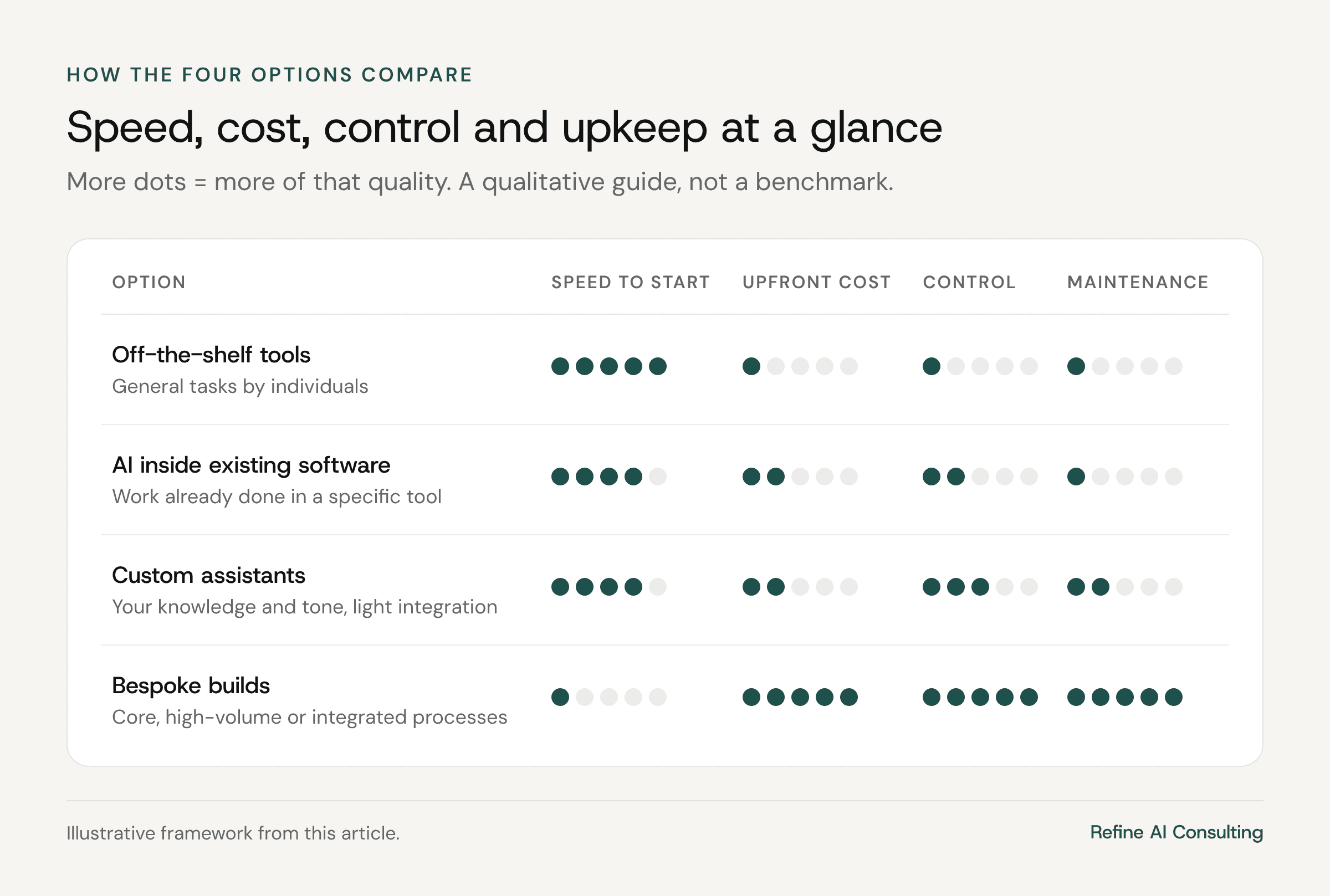
Off-the-shelf tools — fastest to start, lowest cost, least control.
AI inside existing software — fast, moderate cost, control limited to what the vendor offers.
Custom assistants — fast to build, low cost, moderate control, light maintenance.
Bespoke builds — slowest and most expensive to start, most control, ongoing maintenance and migration work.
A decision guide in five questions
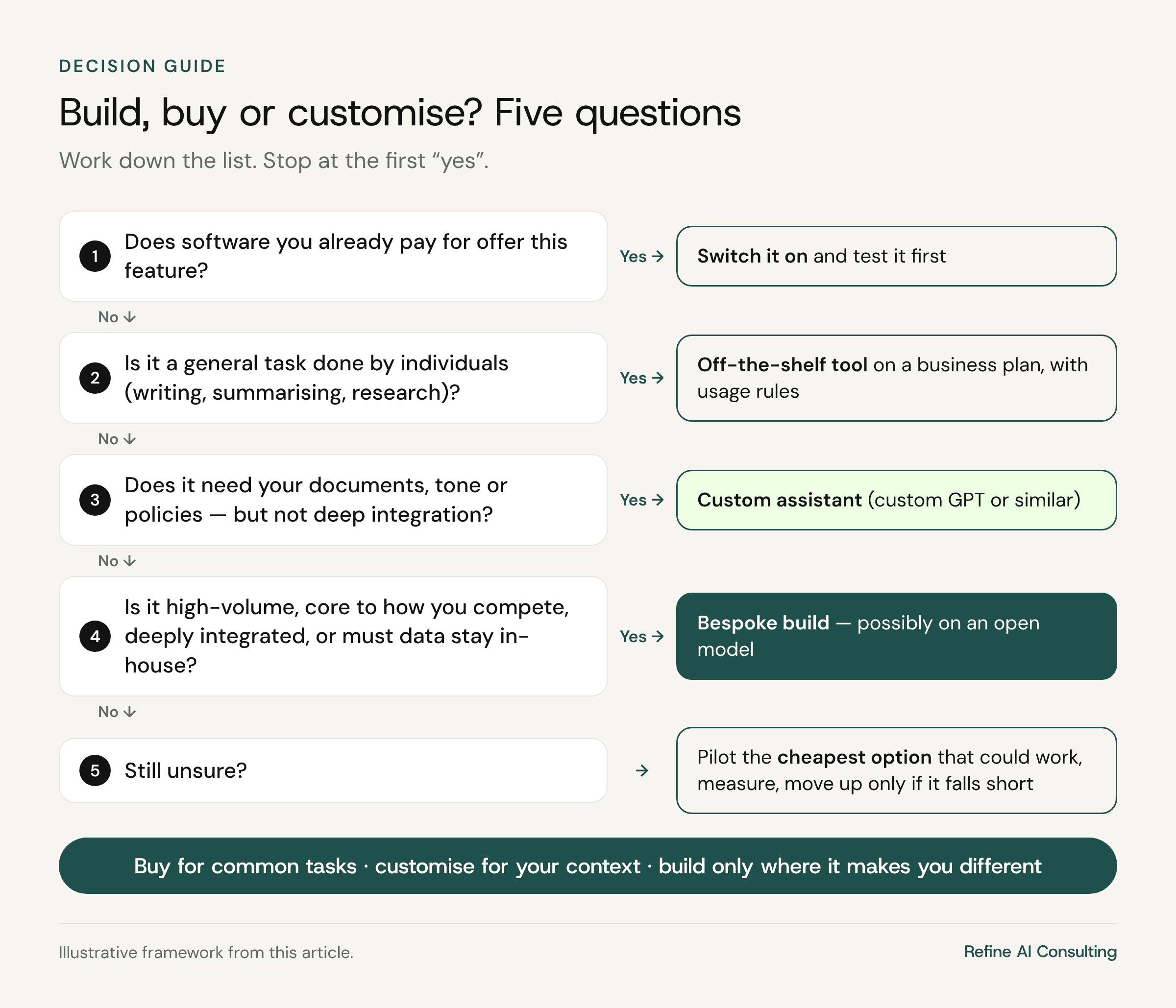
Does software you already pay for offer this feature? If yes, switch it on and test it first.
Is it a general task done by individuals? If yes, use an off-the-shelf tool on a business plan with clear usage rules.
Does it need your documents, tone or policies, but not deep system integration? If yes, configure a custom assistant.
Is it high-volume, core to how you compete, deeply integrated, or must the data stay in-house? If yes, consider a bespoke build, possibly on an open model.
Still unsure? Pilot the cheapest option that could work, measure it against a baseline, and move up only if it falls short.
A useful rule of thumb: buy for common tasks, customise for your context, and build only where it makes you different.
Risks to check whatever you choose
Data and GDPR — where data is processed, what the vendor may do with it, and whether a data processing agreement is in place.
Lock-in — how hard it would be to switch vendor or model.
Cost drift — per-user and usage costs that grow quietly as adoption grows.
Approval controls — whether you can require a person to approve sending, publishing or spending.
Licences — especially for open models used commercially.
Frequently asked questions
Is building always more expensive than buying?
Upfront, usually yes. Over several years, a build can be cheaper for high-volume work, but only if you include maintenance and migration costs in the comparison.
Can we combine options?
Yes, and most companies do: off-the-shelf tools for everyday work, AI inside core software, and one or two custom or bespoke solutions where they matter most.
Who should own the decision?
The business owner of the process, with IT checking security, data and integration. Neither should decide alone.
Not sure which route fits your use case? Our AI roadmap workshop helps you choose between build, buy and customise for each priority, and our AI consulting for SMEs can take you from decision to delivery.
Free download
The AI Readiness Checklist
25 questions to find out whether your business is ready for AI — and what to fix first. Enter your email and download the PDF instantly.
Want an AI roadmap like this for your business?
In a two-day workshop, we turn your team’s ideas into a prioritized AI plan you can start executing within 90 days.

