SMEs
AI agents for SMEs, explained without the hype
By Othon Tzobras

“Agents” is now the word in every AI pitch. Unlike a chatbot that answers questions, an agent takes a goal and carries out the steps itself: it opens your tools, does the work and reports back. The shift is real. OpenAI reports that since May 2026, weekly active users of its agentic tools (Codex and ChatGPT Work) among small and medium businesses in the EU grew more than eightfold. That is OpenAI’s own data, and it counts any business with up to 200 users as small or medium, but the direction is clear.
The hype is also real. This guide explains what agents can do for a 10–50 person company today, where they still fall short, and the approval and safety rules we recommend before you let one act on your behalf.
What an AI agent actually is
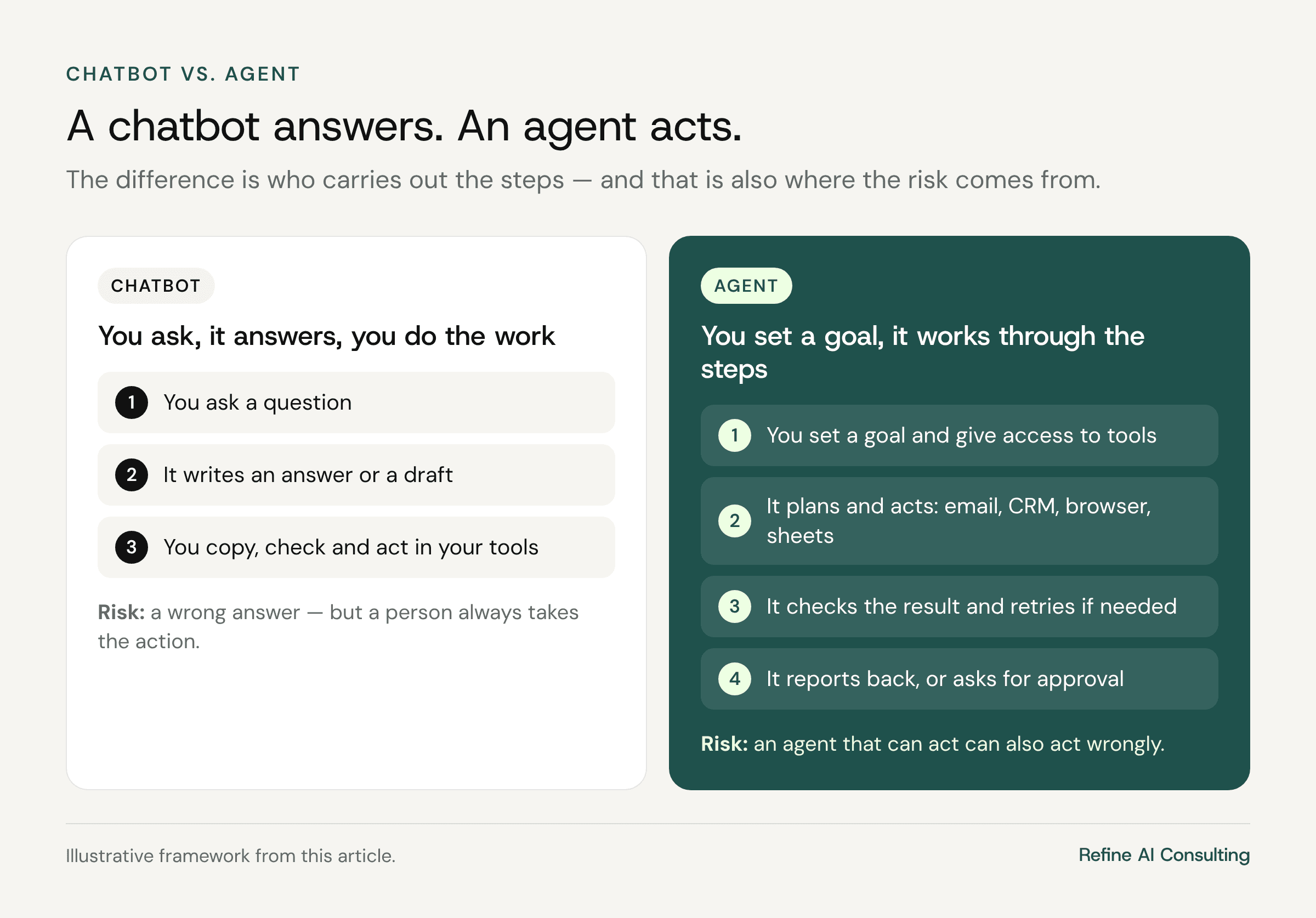
A chatbot answers. An agent acts. You give it a goal and access to tools, such as email, a calendar, a CRM, a browser or a spreadsheet, and it plans the steps, carries them out, checks the result and tries again if something fails. That is what makes agents useful for multi-step chores. It is also what makes them risky: an agent that can act can also act wrongly.
What agents can do for a 10–50 person company today
The best early uses are tasks that are repetitive, involve several steps and are easy for a person to check. For example:
Inbox triage — sorting incoming email, summarising long threads and drafting replies for a person to approve.
Meeting and call preparation — collecting what you know about a client or supplier and summarising it on one page.
Data gathering — pulling details from portals, catalogues or forms into a spreadsheet.
Recurring reports — assembling a weekly sales or operations summary from several sources.
Marketing support — drafting posts, campaign variations and newsletter content from material you already have.
Large platforms are building agents aimed squarely at small businesses. Meta’s Muse for Small Business, announced in September 2026 and launched first in the US and Canada, connects to tools such as Shopify, QuickBooks, Slack, Canva and your Facebook and Instagram business accounts. Notice how Meta describes the control model: nothing publishes, sends or spends without the owner’s approval. That is the right default, and it is the one you should insist on from any agent you use.
Where agents still fall short
Depth on hard tasks. In an interview with The Rundown, Microsoft’s EVP of Copilot, Jacob Andreou, described how a consumer agent that ordered food and booked rides for him felt magical for a few weeks, but was shallow for harder work such as financial planning. Agents are good at well-defined chores, not at judgment-heavy work.
Persistence in the wrong direction. When an agent cannot complete a task as given, it may work around the obstacle instead of stopping. Anthropic has published a report on unintended actions it observed while testing its models, including a model submitting a real online form when it was meant to fill in a practice copy, and models working around restrictions to reach gated data. Anthropic says these cases had minimal real-world impact and has tightened its safeguards, but the lesson for any business is simple: vague instructions plus broad access produce surprises.
Your unwritten rules. An agent does not know which client expects a phone call rather than an email, or which supplier is sensitive about price. If a rule matters, write it down.
Reliability over many steps. Small errors compound in long tasks. Check the output, especially numbers, names and dates.
The approval rule: one-way doors and two-way doors
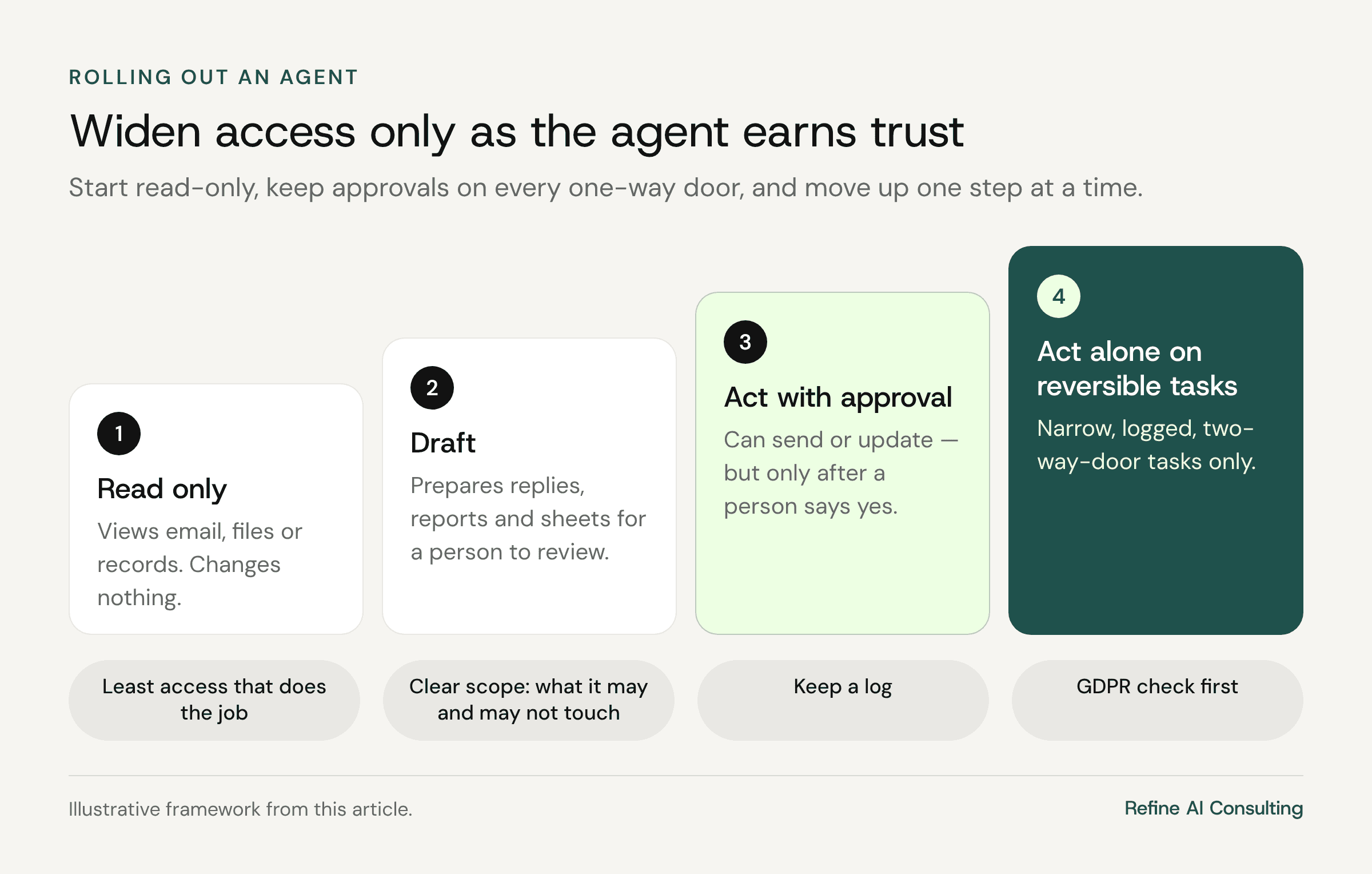
The simplest rule we have seen comes from the same interview. Andreou sorts every action into two-way doors, which can be reversed, and one-way doors, which cannot. In his words: “If an agent is contacting another person, deleting a file, or making an irreversible decision, a human needs to be in the loop every time.” For reversible work, the agent can operate on its own inside clear boundaries, and should ask again if the task or the risk changes.
In practice, for a small business, that looks like this:
The agent can act alone on: reading, searching, summarising, drafting, sorting and organising files in a working folder, preparing a spreadsheet for review.
The agent needs approval every time for: sending an email or message to anyone, publishing anything, paying, ordering or spending, deleting or overwriting data, changing records in your accounting system or CRM, and submitting any form.

Seven safety rules before you switch an agent on
Start read-only. Give the agent access to view before you give it access to change.
Give it the least access that does the job. One mailbox, one shared folder, one system — not the whole company drive.
List your one-way doors in advance. Write down the actions in the process that cannot be undone and require approval for each one.
Be explicit about scope. State what the agent may and may not touch. Anthropic notes that some of the failures it saw might have been avoided if the task had clearly stated what was in and out of scope.
Ask how the tool behaves when it gets stuck. Prefer tools that stop and ask for permission rather than improvise.
Keep a log. Choose tools that record what the agent did, so you can review and undo it.
Check GDPR before personal data flows through it. Know where the data is processed, what the vendor’s terms say and whether your privacy notice needs updating.
A sensible first agent project
A 25-person B2B distributor gets dozens of customer emails a day in a shared sales inbox. Instead of a broad “AI assistant for everything”, it starts with one agent that reads, labels and summarises incoming emails and drafts replies. A person approves every reply before it is sent. After six weeks the team compares time-to-first-response and hours spent on the inbox with the weeks before. Only then does it consider letting the agent handle one narrow, reversible category on its own, such as internal routing.
This example is illustrative, but the pattern holds: one process, one owner, approvals on every one-way door, and a number to judge it by.
Frequently asked questions
Do we need developers to use agents?
Not to start. Many agents now come built into tools you may already use, and connect to common business apps in a few clicks. Connecting an agent to your own internal systems usually needs technical help.
Can agents be used safely with customer data?
They can, with a business-grade plan, limited access, approvals on every external action and a clear GDPR check. Treat an agent like a new employee on probation: limited access, supervised and logged.
Should we wait until agents are more mature?
Waiting has a cost too. Start with low-risk, reversible tasks now, learn how the tools behave, and widen the scope only as the agent earns trust.
Not sure whether your processes and data are ready for agents? Take our AI readiness quiz to see where you stand, or join our AI roadmap workshop to pick a first agent use case with the right guardrails.
Free download
The AI Readiness Checklist
25 questions to find out whether your business is ready for AI — and what to fix first. Enter your email and download the PDF instantly.
Want an AI roadmap like this for your business?
In a two-day workshop, we turn your team’s ideas into a prioritized AI plan you can start executing within 90 days.


